


Google’s Next Android Trick: AI-Generated Lock Screen Clocks
Google is preparing generative AI lock screen clocks for Android. Here is why customized typography and diffusion art signal a bigger mobile shift.
8 min read

TL;DR Google is preparing to bring generative AI directly to the Android lock screen, allowing users to create prompt-driven clock visual styles and dynamic typography. Beyond personal flair, this experimental feature signals a broader industry move toward turn-key generative user interfaces on idle mobile displays.
Look at your smartphone screen right now while it sits idle on your desk. For nearly two decades, the mobile lock screen has remained one of the most underutilized digital real estate plots in consumer technology. It gives you the time, a battery percentage, a trickle of unread notifications, and perhaps a family photo or high-contrast wallpaper.
When Apple introduced depth effects, customizable typography, and stacked widgets in iOS 16, it felt like a minor revolution for dynamic phone surfaces. But Google is now preparing a far more radical leap. Uncovered code strings and internal system builds indicate that future iterations of Android will allow users to generate bespoke lock screen clock designs using generative text-to-image and generative typography pipelines.
Instead of selecting from a preset menu of ten stock fonts and a color picker wheel, Android users may soon type prompts like “steampunk brass numerals with glowing neon tubes” or “minimalist Japanese calligraphy inked in watercolor” to generate entirely unique clock faces. It is a subtle feature on the surface, but it represents a seismic shift in how software engineers approach user interface design. We are moving away from fixed graphical assets and toward fluid, AI-synthesized interface components.
 Google Pixel smartphone resting on wooden desk displaying ambient clock screen — Photo by Rahul Pandit on Pexels
The Death of Static Typography: How Generative Clock Faces Work
To understand why AI-generated clock faces matter, you have to look at how traditional operating systems render time. In a standard mobile OS, a system font file contains vector paths for characters zero through nine. When the display ticks from 10:41 to 10:42, the graphics subsystem simply swaps out vector paths, applies a color tint selected from a palette, and pushes those pixels to the display processor. It is hyper-efficient, predictable, and visually static.
Google’s emerging generative approach flips this model on its head by treating typography as dynamic art. By integrating specialized diffusion models and lightweight rasterization nodes directly into the OS customization picker, Android can synthesize custom visual textures, dynamic shading, and organic shapes that wrap around numerical digits.
When a user crafts a prompt within the lock screen customization suite, the system doesn’t merely apply a filter over existing font files. It synthesizes a high-resolution graphical asset that harmonizes numeric geometry with stylistic prompts. If you are exploring the latest consumer trends across consumer ai apps, you know that user interface personalizations are quickly shifting from static theme packs to live, prompt-driven generations.
This generative approach builds directly upon Google’s Material You design philosophy, introduced in Android 12. Material You used algorithmically extracted colors from a user’s static wallpaper to recalculate system accents across the entire device. Generative lock screen clocks take that philosophy to its logical destination: instead of extracting colors from an image, the operating system generates entirely new visual elements based on user context, dynamic lighting, and natural language prompts.
Under the Hood: On-Device Neural Hardware vs. Edge Processing
Synthesizing generative artwork in real time is computationally expensive, raising immediate technical questions. How can a smartphone generate detailed visual themes for a clock without frying its battery or requiring a continuous cloud connection?
The answer lies in hybrid edge-computing pipelines. Google has spent years refining on-device machine learning acceleration through its Tensor Processing Units (TPUs) embedded inside Pixel chips, alongside similar Neural Processing Units (NPUs) built into Qualcomm’s Snapdragon platforms. To explore the hardware research driving these small-scale models, you can read more at Google AI Research.
Instead of running a massive multi-billion parameter diffusion model every time the clock ticks to a new minute, the generative rendering process is split into distinct operational phases:
- Prompt Synthesis & Latent Generation: When the user designs or requests a new clock style in the customization settings, the on-device NPU runs an inference cycle to generate the visual base texture and character geometry.
- Vector and Depth Mapping: The generated visual asset is sliced into numerical glyph masks (0 through 9) and paired with depth map data, allowing the clock to react dynamically to system notifications or background wallpaper layers.
- Low-Power Ambient Compositing: Once the clock style asset is compiled, the system hands execution over to a ultra-low-power Display Processing Unit (DPU). Updating the display every minute consumes virtually no additional battery power because the heavy neural generation phase occurred entirely upfront during the setup process.
By decoupling the high-cost generation step from the low-cost rendering loop, Android can deliver hyper-stylized visual components without sacrificing the battery endurance required for ambient, always-on displays.
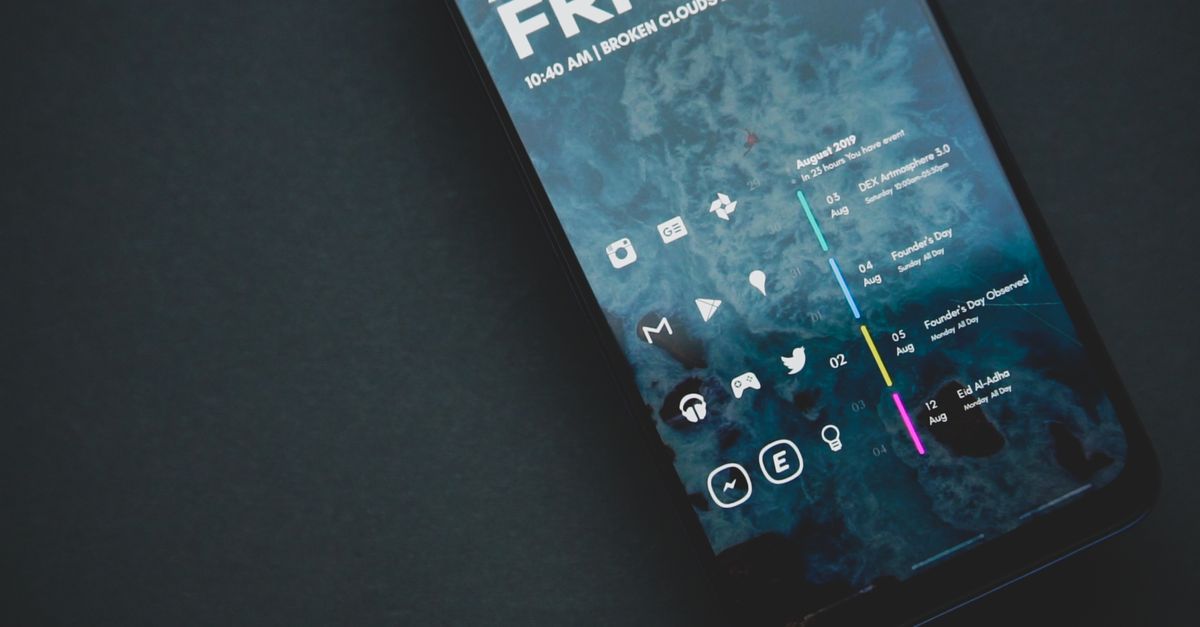 Mobile phone screen showing custom clock typeface design controls — Photo by Emmanuel Jason Eliphalet on Pexels
Comparing Mobile Lock Screen Architectures
To see how Google’s generative approach compares with existing industry implementations, consider how key lock screen parameters stack up across mobile platforms:
| Feature Dimension | Traditional Android (Material You) | Apple iOS (Current) | Google Generative AI (Upcoming) |
|---|---|---|---|
| Typography Source | Pre-installed system vector fonts | Fixed selection of curated typefaces | Prompt-generated parametric glyphs |
| Color Palette Engine | Palette extraction from background image | Manual pickers and system gradients | Neural color synthesis tied to prompt style |
| Asset Generation | Static vector compilation | Static bitmap/vector rendering | Real-time latent diffusion & spatial layers |
| Contextual Flexibility | Basic system theme match | Weather/Time dynamic visual adjustments | Text-prompted art styles and visual themes |
| Compute Overhead | Negligible CPU/GPU cycles | Negligible CPU/GPU cycles | Moderate TPU load during creation phase |
| Offline Capability | 100% Offline | 100% Offline | Edge model offline; hybrid cloud fallback |
This comparison highlights Google’s distinct strategy: while Apple relies on tight artistic curation and predictable font choices to maintain brand elegance, Google is willing to hand the visual controls entirely over to probabilistic neural models.
The UX Danger: Glanceability vs. Visual Chaos
While prompt-generated clocks offer endless creative options, they introduce a distinct user-experience risk: the destruction of basic legibility.
In human-computer interaction (HCI) design, the lock screen clock serves a primary functional purpose: immediate, sub-second time perception. When a user glances at their wrist or tap-awakens a phone sitting on a nightstand, the brain should process the time in under 200 milliseconds.
If an AI generates an overly intricate, hyper-stylized clock face—say, melting clock faces embedded in surrealist Salvador Dalí landscape art—the cognitive load required to read “03:45” spikes significantly. For a deeper look into the principles governing readable character design, review Wikipedia’s overview of typography.
Design researchers warn that unconstrained generative UI options can quickly devolve into visual noise. If text characters become too distorted by prompt modifiers, the interface loses its essential utility. Google’s design engineers must build strict guardrails into the latent generation space, enforcing minimum contrast ratios, stroke thickness boundaries, and character separation rules regardless of how wild the user’s text prompt might be.
As we track broader developments across future tech, balancing expressive user freedom against functional accessibility remains the single hardest hurdle for generative interface design.
Ecosystem Battles: Generative Freedom vs. Apple’s Walled Garden
This experimental lock screen feature highlights a fundamental divergence in design philosophy between Mountain View and Cupertino.
Apple treats the iPhone lock screen as a carefully curated showcase. Every typeface available in iOS is meticulous, hand-crafted, and calibrated for optical readability across different display densities. Apple’s design team sets strict boundaries on font thickness, character spacing, and widget placement to ensure every iPhone looks distinctly like an iPhone.
Google, conversely, has historically treated Android as a canvas for user self-expression. By introducing generative typography, Google is betting that consumers value personal uniqueness over uniform corporate design guidelines.
- Generative UI Pipeline Flow
- User Input Prompt
- On-Device NPU / Edge Model
- Synthesized Latent Glyph Map ──► Accessibility Guardrails
- Low-Power DPU Framebuffer ◄────────────────────┘
Developers looking to leverage these system APIs can monitor updates on the official Android Developers portal. As Google exposes underlying latent generation controls to third-party developers, app creators could eventually build custom clock generators that change dynamically based on calendar events, mood, health telemetry, or ambient music playback.
When paired with modern on-device multimodal models like Gemini Nano, lock screen art could automatically transform depending on your context. A clock rendered during a high-stress workday might adopt a clean, calming monochrome slate, while a clock rendered during an evening run could shift into energetic, high-visibility neon orange geometries. The broader advancements occurring in foundational ai models suggest that operating systems will soon synthesize interface elements on the fly rather than fetching static icons from storage.
The Screen That Never Sleeps
AI-generated lock screen clocks might sound like a small, flashy feature built primarily for marketing keynotes. But dismissing it as a gimmick misses the larger trajectory of mobile computing.
For decades, software development followed a rigid rule: human designers draw interfaces, software engineers code those components into static assets, and the operating system renders those exact pixels onto display hardware. Generative lock screens break that mold completely. They represent early experimentation with soft, adaptive interfaces where software generates its own layout, aesthetic theme, and visual components based on human intent and contextual signals.
As Google continues to embed machine learning models directly into the core framework of Android, the lock screen is evolving from a passive display into an active ambient canvas. Time itself isn’t changing—but the way our devices depict the passing minute is about to get significantly more expressive.
Last updated Aug 7, 2026
Newsroom
Reporting and analysis from the InnotechInsider editorial team, covering the technology shaping tomorrow.
Related stories

The Definitive AI Toolkit: 10 Tools That Actually Reshaped Modern Work
Cutting through generative AI marketing hype reveals a core stack of practical tools transforming daily coding, research, writing, and corporate operations.

Google’s New AI Classroom Play: Inside the Battle for Gen Z’s Mindshare
Google is overhauling its educational suite with LearnLM and NotebookLM, aiming to turn generative AI into an interactive tutor before rivals claim the classroom.

Beyond the Chatbox: The Top 10 AI Tools Reshaping Content Creation in 2025
Generative AI has evolved from novelty prompts to robust creative pipelines. Here are the 10 essential AI tools driving modern content creation in 2025.